
Best Practices for Queue Settings in Microsoft Teams: How to Configure Efficient Routing and Better Customer Experiences
- Performance Metrics

- Dec 3, 2025
- 10 min read

When customers call your business, the call queue is often their first point of contact. A well-configured queue ensures that calls are distributed quickly and efficiently, so customers get the help they need without unnecessary waiting time. But even small mistakes in the setup can have major consequences.
Many companies configure call queues in Microsoft Teams without optimizing the settings. The result is inefficient handling, long wait times, and - worst case - missed calls, which directly impact customer satisfaction and increase employee workload.
Poorly configured queues can lead to some employees becoming overloaded while others barely receive any calls at all. Without clear overflow rules, logical routing, and continuous adjustments, the IT department ends up spending unnecessary time on troubleshooting and support.
To optimize your queue settings, it’s crucial to understand how a call queue actually works. What happens from the moment the customer calls until the call is answered or transferred? Only when you understand each step can you design a structure that supports both the customer journey and your company’s operations.
Understand the Basic Principles of a Call Queue
Before you can optimize your queue settings, it’s important to understand how a call queue actually works. In Microsoft Teams, the queue functions as a digital waiting room where incoming calls are placed until an available employee can answer them. It sounds simple, but behind the scenes there are several settings that have a major impact on how efficiently the queue performs.
A typical call queue consists of several key elements:
A greeting and hold music that welcomes the caller and creates a professional first impression.
Agents or groups who receive calls as soon as they become available.
Routing logic that determines who gets the call first. For example, round robin or longest idle.
Overflow rules that define what happens when the queue becomes too long.
Timeout settings that determine how long a call may wait before it is redirected or disconnected.
It’s also important to understand the difference between an Auto Attendant and a Call Queue. An Auto Attendant acts as a virtual receptionist that helps callers reach the correct department (e.g., “press 1 for support, press 2 for sales”). The Call Queue takes over once the selection is made, placing calls into the appropriate queue where agents handle them.
Even the best queues require ongoing maintenance. Opening hours change, employees move between departments, and call patterns shift. That’s why governance and regular review are essential.
Why Queue Settings Are Critical to the Customer Experience
A call queue is often the customer’s first interaction with your business. If the queue is well-structured and responds quickly, the service feels efficient and professional. But if the customer waits too long or gets passed around between employees, frustration builds, damaging both trust and the relationship.
Queue settings have a significant impact on how the customer experiences your service. To the caller, even a few seconds of waiting can feel like an eternity, especially if it happens repeatedly. A few seconds here and there can quickly snowball into accumulated frustration and declining trust. For the business, this translates into fewer answered calls, increased pressure on support teams, and a service experience that feels less professional - even if the work behind the scenes is running smoothly.
Even a well-designed queue structure can lose effectiveness if the settings don’t reflect the organization’s actual behavior. Perhaps there are too many agents in a single queue, or calls are being handled in an order that doesn’t align with the team’s workflow. Small imbalances in routing, timeout, or overflow settings can cause major differences in response times and customer satisfaction.
📊 Did you know?
Over 60% of customers hang up if they have to wait more than one minute, and around one-third hang up after just one to five minutes of waiting.
The message is clear: Queue settings aren’t just about technology - they’re about service quality and expectation management. A thoughtfully configured queue shows customers that your business values their time.
The Key to Success: The Interaction Between System and Behavior
Even the most advanced queue setup will fail if employees don’t understand or don’t follow its logic. A large part of the system’s efficiency depends on the interaction between technology and human behavior.
If an employee forgets to update their Teams status, the system may think they’re available even when they’re in a meeting. The result? Calls land in the wrong place, wait times increase, and frustration spreads among both customers and colleagues. The same happens when agents log into too many queues at once, or when managers manually adjust queue settings without coordinating with IT.
Successful queue management requires more than technical configuration. It requires awareness and discipline across the organization. When agents understand how their availability affects call flow, and when IT teams can visualize real-time data, it creates a culture where technology and behavior work together toward one goal: delivering a smooth, efficient, and professional customer experience.
The Most Common Mistakes in Queue Configuration
Even though call queues are a core part of any modern telephony setup, they are often configured without a clear strategy. Here are some of the most common mistakes:
Lack of structure in large queues - A high number of agents only works when there are clear rules for distribution and responsibility.
No properly defined overflow rules, causing calls to remain stuck for too long or be disconnected.
Routing methods chosen at random, rather than based on actual call patterns and agent behavior.
Out-of-date greetings, opening hours, and messages, resulting in customers receiving incorrect information.
No integration with presence status, meaning the system believes employees are available even when they’re in meetings or already on calls.
Many IT administrators only notice the issues once the symptoms appear: missed calls, complaints about long wait times, or inefficient workdays. The problem is rarely the system itself, but rather the lack of data, governance, and ongoing maintenance.
Best Practices for Queue Settings and Routing
Effective queue management isn’t about finding the “right” configuration once and for all. It’s about building a structure that can continuously adapt to changes in your organization. With the right settings and a data-driven approach, you can ensure shorter response times, more balanced workloads, and a significantly better customer experience.
Here are the key best practices that can help you optimize your Teams queues based on both technical expertise and real operational insights from companies using VoiceQ365 as their management tool.
Choose the Right Routing Method
One of the most important factors in queue configuration is how calls are distributed among agents. Microsoft Teams supports several routing strategies, each with its strengths depending on the team’s workflow and the organization’s goals.
Round Robin:
Calls are distributed evenly among all available agents. This method is ideal for teams where everyone has roughly the same skill level and where fair and balanced call distribution is a priority.
Longest Idle:
The system routes the call to the agent who has been idle the longest. This ensures an even workload and minimizes the risk of certain employees becoming overloaded.
Attendant (Simultaneous Ring):
All agents receive the call at the same time, and the first person to answer takes it. This method is commonly used in sales environments or reception desks where rapid response is critical - though it can also create stress if used without clear guidelines.
Serial Routing:
Calls are sent in a fixed order, for example, from senior to junior employees. This is a suitable option in technical support environments where experience or role determines who should pick up the call first.
Best practice? Choose your routing strategy based on your business objective.Make sure to document and standardize which routing methods are used where. This strengthens governance, simplifies troubleshooting, and ensures consistency across the organization.
Use Data to Size Your Queue Correctly
Many queues are either over- or under-sized because they’re configured based on guesswork or outdated assumptions. Instead, use statistics and real-time measurements to make informed decisions.
With VoiceQ365, you can analyze call volume, wait times, and peak load periods. This allows you to adjust the number of agents, fine-tune timeout rules, and optimize routing based on actual patterns.
Avoid adding too many agents to a single queue as it increases complexity and can lead to longer response times. A well-balanced setup improves efficiency and creates clarity around who is responsible for what.
Implement Presence-Based Routing
Queue management becomes truly effective when it reflects the agents’ actual availability. With presence-based routing, only agents who are genuinely available will receive calls.
However, this requires that employees understand how their Teams status is updated and how the Outlook calendar influences it. A “Busy” calendar entry tells the system to block calls, even if the employee would otherwise be able to take them.
A short internal training on calendar discipline can make a big difference: teach employees how to reserve time for tasks while still appearing available if they want to receive calls. This creates a balance between focus and flexibility, and ensures that the routing logic works as intended.
Define Clear Overflow and Timeout Rules
No queue should run forever. Set precise rules for what happens when the system reaches its limit. When all agents are busy, or the queue hits capacity, calls should automatically forward into a well-designed flow. For example, this could be a secondary queue, an Auto Attendant, or a final message that tells the caller what to expect next.
All messaging should reflect the company’s tone and set clear expectations instead of just ending the call. This creates confidence and shows professionalism.
Test overflow scenarios continuously as performance data is collected. Many organizations only realize their rules are failing when customers start to complain, or worse, when reliability slips and frustrations go public. Reviewing your setup regularly keeps service levels predictable, fair, and calm for everyone calling.
Optimize Greetings and Hold Music
The customer experience begins the moment they dial your number - not when they reach an agent. Professional greetings and hold music are therefore part of your company’s brand.
Keep greetings short and clear - ideally under 15 seconds. Use different messages depending on the time of day, and ensure the hold music reflects your company’s tone and identity. A brief “Thank you for your patience” during wait times can also make a big difference.
By integrating message management into your governance structure, you ensure that all messages stay up to date and consistent across departments and languages.
Establish Governance for Naming and Ownership
As the number of queues grows, it quickly becomes difficult for the IT department to maintain a clear overview. That’s why governance is absolutely essential.
Name queues according to a consistent structure - for example, DK_Support_Q1 or SE_Sales_Q2 - so it is always clear which department, location, and function they belong to. Document ownership, change history, and purpose in a shared governance file.
With the Coherence platform from Performance Metrics, you can manage this across customers and tenants, ensuring queues stay organized and consistent no matter how complex the environment becomes.
Test, Measure, and Adjust Continuously
Even the best setup requires ongoing maintenance. Customer behavior changes, and so do call volumes, peak times, and agent capacity.
Use real-time analytics to monitor calls, response times, and agent performance. Identify trends - for example, increasing wait times during specific hours - and use the data to adjust routing, agent counts, or opening hours.
Set up regular reviews of your queues, such as monthly or quarterly, and involve both IT and department leaders. When operations and business teams collaborate on optimization, you create a flow that not only reduces wait times but also strengthens the overall customer experience.
Area | What It Covers | Best Practice | Benefit |
Routing Method | How calls are distributed among agents | Choose a strategy based on your goal: • Round Robin – even distribution • Longest Idle – fair workload • Attendant – fast response • Serial – hierarchical distribution | Aligns queue logic with business objectives and reduces wait times |
Sizing | Number of agents and queue capacity | Use data to adjust agent count and timeout rules based on real call volume | Reduces over/under-sizing and creates balance |
Presence-Based Routing | Availability based on Teams status | Train employees in calendar discipline and status behavior | Fewer missed calls and more accurate routing |
Overflow & Timeout Rules | What happens when the queue is full | Define clear thresholds and redirect calls to voicemail, backup queues, or messages | Prevents missed calls and improves customer satisfaction |
Greetings & Hold Music | First impression during wait time | Keep messages short and updated; use brand-aligned music | More professional experience and lower abandonment rate |
Governance | Structure and ownership of queues | Use a naming convention and document changes in the Coherence platform | Improves visibility, consistency, and ease of administration |
Continuous Optimization | Ongoing evaluation and improvement | Monitor KPIs and conduct regular reviews | Prevents operational issues and ensures continuous improvement |
How Performance Metrics Helps
For many IT departments, the challenge isn’t understanding queue logic but maintaining a clear overview as the number of queues, users, and departments grows. Even small changes in Microsoft Teams can quickly become time-consuming and error-prone, and this is where Performance Metrics makes a significant difference.
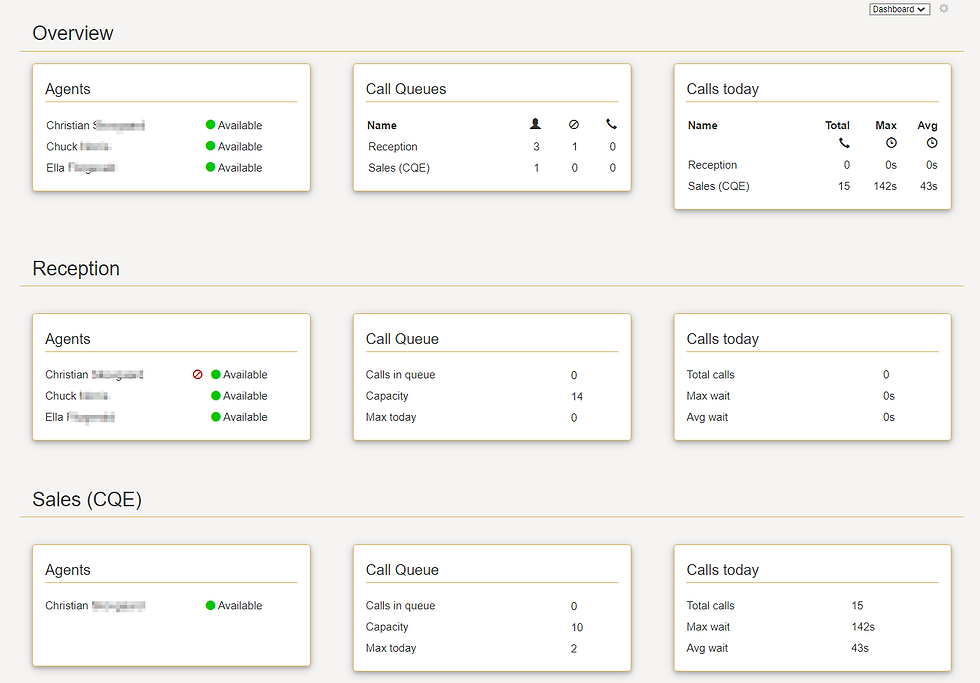
With VoiceQ365, you get real-time insight into all your company’s queues in one unified dashboard. You can see who is logged in, how many calls are waiting, and how performance shifts throughout the day. The system makes it easy to analyze trends, identify bottlenecks, and take action before they impact the customer experience.
While VoiceQ365 provides visibility and control, the Coherence platform ensures the governance, traceability, and oversight needed across the entire organization - or across multiple customers in a multi-tenant environment. It makes it simple to manage queues, standardize naming conventions, and track changes over time.
From routing to reporting, Performance Metrics brings everything together in one place, allowing IT to focus on strategy and business development instead of routine tasks. The result is greater efficiency, happier employees, and a customer experience that feels both professional and personal.
Conclusion – When Queue Management Becomes a Competitive Advantage
Effective queue management isn’t just about technology. It’s about people, processes, and experiences. The right setup ensures that customers quickly receive the help they need, while employees can work with focus and without unnecessary interruptions.
When your routing strategy matches your organization’s workflow, both wait times and stress levels decrease, and customer satisfaction rises. A well-designed queue environment becomes more than an operational tool; it becomes a genuine competitive advantage.
With Performance Metrics’ solutions, you gain insight, control, and flexibility. You can monitor, optimize, and adjust your queues continuously without added complexity. This creates peace of mind in daily operations and provides a foundation that scales with your business.
Want to see how you can optimize your queue settings with a single click?
Book a demo of VoiceQ365 today and take full control of your Teams queues - from routing to reporting.
Comments